> For the complete documentation index, see [llms.txt](https://wiki.packstack.de/llms.txt). Markdown versions of documentation pages are available by appending `.md` to page URLs; this page is available as [Markdown](https://wiki.packstack.de/packstack-connect/publish-your-docs-1/kartonrechner.md).
# Kartonrechner
So kommst du dahin:
Home ➡️ Lager ➡️ Kartonrechner
***
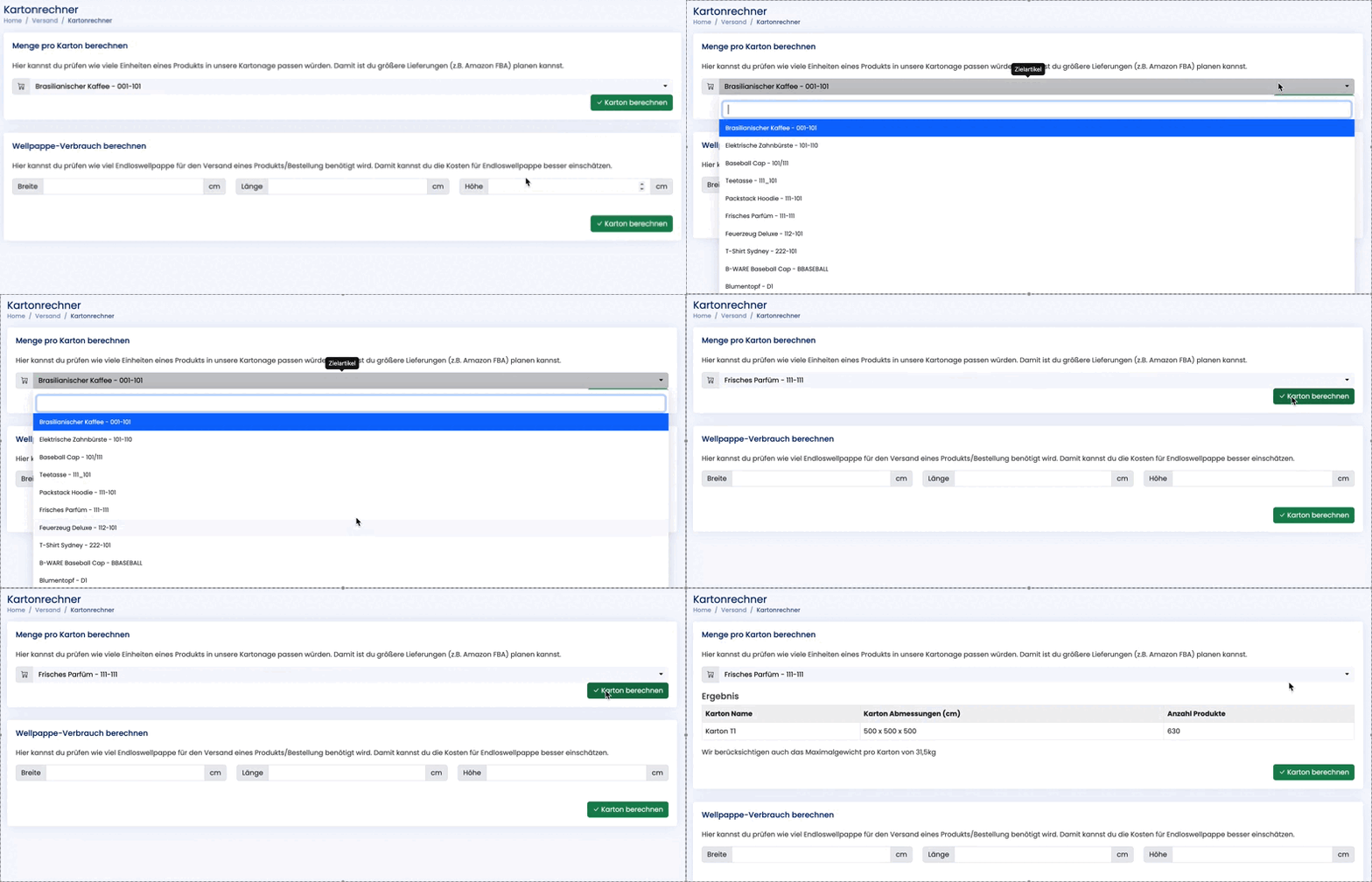
Mit dem Kartonrechner kannst du dir für jedes deiner Produkte anzeigen lassen, wie hoch die Anzahl eines Produktes ist, die in einen von der 3D-Verpackungsanlage produzierten Karton passen würden oder wie hoch der Verbrauch an Wellpappe bei bestimmten Produkten oder Bestellungen ist.
{% hint style="info" %}
Die Produktdaten für die Berechnung der Kartonage basiert auf den Angaben in Shopify, die du bei [Varianten Metafelder](/shopify/produkt-varianten-metafelder.md) angegeben hast.
{% endhint %}
#### Menge pro Karton berechnen
**So funktioniert's:**
1. Klicke in der Lagerkennzahlen-Übersicht auf das Taschenrechner-Icon in der oberen rechten Ecke, um zum Kartonrechner zu gelangen.
2. Wähle in dem Dropdown-Menü das zu berechnende Produkt aus.
3. Mit Klick auf "Karton berechnen" kannst du nun sehen, wie viele Einheiten dieses Produktes in einen von der 3D-Verpackungsanlage produzierten Karton passen würden.
#### Wellpappe-Verbrauch berechnen
**So funktioniert's:**
1. Trage die Maße des Produktes oder der Bestellung (Breite, Länge, Höhe) in cm in die entsprechenden Felder ein.
{% hint style="info" %}
**Beachte:** Wenn du den Wellpappe-Verbrauch einer Bestellung mit mehreren Produkten brechnen möchtest, müssen die einzelnen Maße vorher zusammengerechnet und eingetragen werden.
{% endhint %}
2. Klicke auf "Karton berechnen", um zu sehen, wie hoch der Verbrauch dieses Produktes bzw. dieser Bestellung voraussichtlich sein wird.