> For the complete documentation index, see [llms.txt](https://wiki.packstack.de/llms.txt). Markdown versions of documentation pages are available by appending `.md` to page URLs; this page is available as [Markdown](https://wiki.packstack.de/packstack-connect/einstellungen/versandprofile.md).

# Versandprofile

So kommst du dahin:

***

### **1. Versandprofile verwalten** <a href="#ffkjgpqyysfb" id="ffkjgpqyysfb"></a>

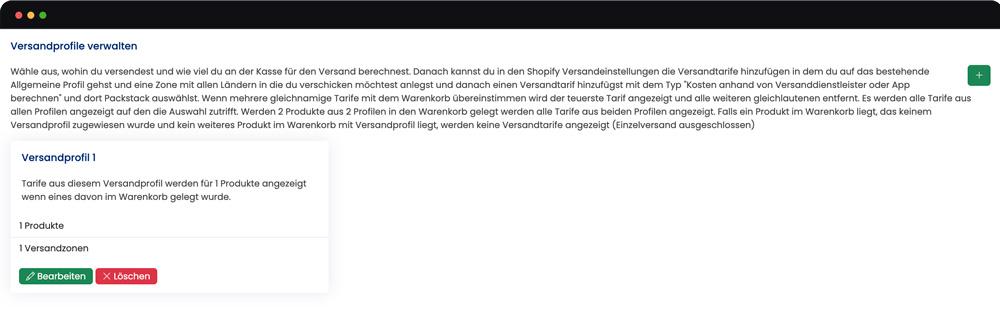
Auf dieser Seite hast du eine Übersicht für all deine Versandprofile. Wenn du ein neues Versandprofil erstellen möchtest, dann musst du auf das + klicken. Anschließend vergibst du einen Namen und bestätigst das Versandprofil.

<figure><img src="/files/U2rWVJa3M7wq9O3YgYMB" alt=""><figcaption></figcaption></figure>

Um nun die Einstellungen des Versandprofils vorzunehmen, musst du auf “Bearbeiten” klicken.

<figure><img src="/files/XQJkh7RoltR9oVPLclld" alt=""><figcaption></figcaption></figure>

### **2. Versandprofil anpassen** <a href="#id-3m06a7c6xqum" id="id-3m06a7c6xqum"></a>

<div align="left"><figure><img src="/files/v6uPl07fy5DSuUef6NRA" alt=""><figcaption></figcaption></figure></div>

In diesem Fenster hast du folgende Einstellungsmöglichkeiten:

* Namen vergeben
* Versandzonen verwalten
  * auf + drücken, um eine neue Versandzone hinzuzufügen
* Produkte verwalten
  * Welche Produkte sind von diesen Regelungen betroffen

**2.1 Versandprofil anpassen:**

* Hier trägst du den Namen deines Versandprofils ein

**2.2 Versandzonen verwalten:**

Drücke auf das +, um eine neue Versandzone hinzuzufügen

**2.3 Einstellung der Versandzone**

**1. Name eingeben** (typischerweise den Namen der Zone/Region/Land)

**2. Versandtarife verwalten**

* auf + drücken, um hinzuzufügen
* auf Stift klicken, um zu bearbeiten

<div align="left"><figure><img src="/files/g4ixNDbonykmiwYiZ6id" alt=""><figcaption></figcaption></figure></div>

**3. Länder verwalten**

* im Dropdown das Land/die Länder hinzufügen und aktualisieren

<div align="left"><figure><img src="/files/yuzRmhQfwjICmjCAr4Hj" alt=""><figcaption></figcaption></figure></div>

{% hint style="warning" %}
Nachdem du alle Einstellungen für deine Versandprofile vorgenommen hast, musst du uns einmal Bescheid geben. Anschließend kümmern wir uns darum, dass deine Versandprofile freigeschaltet und mit Shopify synchronisiert werden.

Die Versandprofile werden in Shopify unter “Versand und Zustellung” hinterlegt.
{% endhint %}


---

# Agent Instructions
This documentation is published with GitBook. GitBook is the documentation platform designed so that both humans and AI agents can read, navigate, and reason over technical content effectively. Learn more at gitbook.com.

## Querying This Documentation
If you need additional information that is not directly available in this page, you can query the documentation dynamically by asking a question.

Perform an HTTP GET request on the current page URL with the `ask` query parameter, and the optional `goal` query parameter:

```
GET https://wiki.packstack.de/packstack-connect/einstellungen/versandprofile.md?ask=<question>&goal=<endgoal>
```

`ask` is the immediate question: it should be specific, self-contained, and written in natural language.
`goal` is optional and describes the broader end goal you are ultimately trying to accomplish on behalf of the user. GitBook uses it to tailor the answer towards what is most useful for that goal.

The response will contain a direct answer to the question and relevant excerpts and sources from the documentation.

Use this mechanism when the answer is not explicitly present in the current page, you need clarification or additional context, or you want to retrieve related documentation sections.