> For the complete documentation index, see [llms.txt](https://wiki.packstack.de/llms.txt). Markdown versions of documentation pages are available by appending `.md` to page URLs; this page is available as [Markdown](https://wiki.packstack.de/packstack-connect/einstellungen/e-mail-templates.md).
# E-Mail Templates
So kommst du dahin:
Home ➡️ Einstellungen ➡️ E-Mail Templates
***
### **1. Der Vergleich mit Shopify**
| Shopify | Packstack Connect |
| ------------------------------------------------------------------------------------------------------------------------------------------------------------------------- | --------------------------------------------------------------------------------------------------------------------------------------------------------- |
|
✅ Shopify benachrichtigt, sobald das Paket versendet worden ist
❌ Danach erhält man keine weiteren Informationen
❌ Keine große Anpassungsmöglichkeiten
|
✅ Packstack bietet detaillierte Benachrichtigung
✅ Mehr Transparenz im Versandprozess
✅ Du kannst die E-Mail Templates selbst anpassen
|
***
So kommt man zu den E-Mail Templates:
Einstellungen ➡️ E-Mail Templates
***
### **2. Länderübergreifende Templates**
Diese Templates geben übergreifend das Layout und das grundlegende Design der länderspezifischen E-Mails vor. Das vermeintlich wichtigste Template ist hierbei das “Basis-Template für Trackingnachrichten”, das das Design der Trackingnachrichten regelt.
In der linken Spalte steht der Name des Templates. In der Spalte rechts daneben findest du eine kurze Beschreibung des Templates.
👁️ Klickst du auf das Auge, dann kannst du dir die Vorschau anzeigen lassen.
✉️ Klickst du auf den Brief, dann kannst du dir eine Test-Mail an deine eigene E-Mail-Adresse senden lassen.
✏️ Klickst du auf den Stift, dann kannst du das Template bearbeiten.
### **3. Länderspezifische Templates**
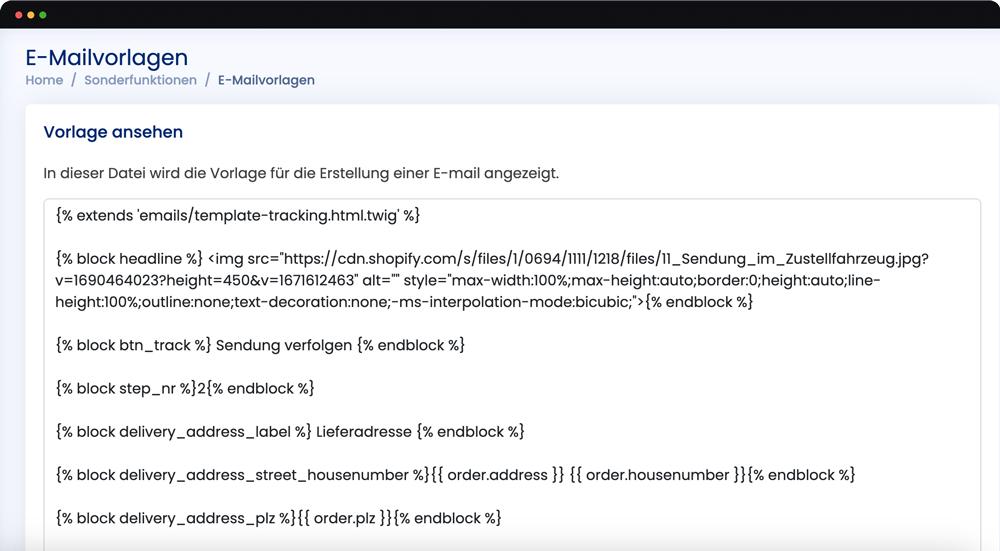
Diese Templates sind für jedes Versandland individuell anpassbar. Hier bearbeitest du insbesondere den Text und individuelle Designanpassungen der einzelnen Trackingnachrichten, wie bspw.
* Übersetzungen
* individuelle länderspezifische Versandkonditionen
* Einfügen eines Header-Bildes
* Einfügen von individuellen Grafiken
In der linken Spalte der Template-Übersicht steht der Name des Templates. In der Spalte rechts daneben findest du eine kurze Beschreibung des Templates.
👁️ Klickst du auf das Auge, dann kannst du dir die Vorschau anzeigen lassen.
✉️ Klickst du auf den Brief, dann kannst du dir eine Test-Mail an deine eigene E-Mail-Adresse senden lassen.
✏️ Klickst du auf den Stift, dann kannst du das Template bearbeiten.
{% hint style="info" %}
In der ersten Zeile des Codes siehst du, dass dieses Template eine Erweiterung des Basis-Templates für Trackingnachrichten ist.
{% endhint %}
### **4. Übersetzungen**
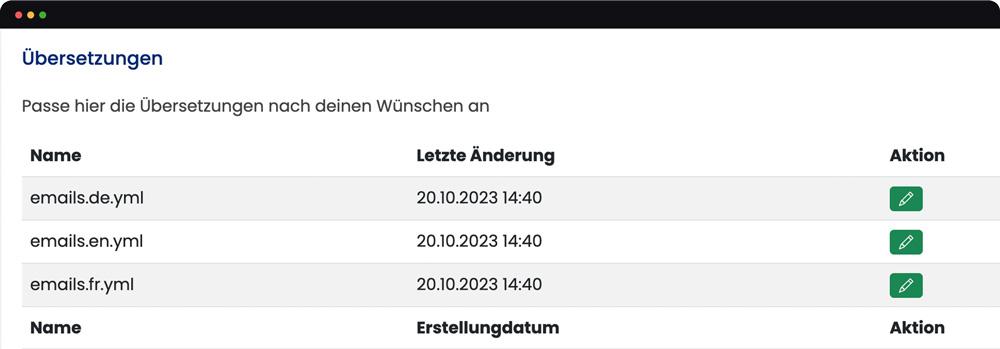
Wenn du in der E-Mail Templates Übersicht etwas nach unten scrollst, dann siehst du das Feld “Übersetzungen”. Hier sind diese Dateien relevant:
* emails.en.yml
* emails.fr.yml
* emails.de.yml
In diesen Dateien kannst du die Übersetzungen der Betreffzeilen der Trackingnachrichten mit Klick auf den Stift anpassen.

{% hint style="danger" %}
Bitte ausschließlich die Sätze und Wörter in Anführungszeichen bearbeiten und nicht den restlichen Code, da sich sonst die Formatierung ändern könnte.
{% endhint %}
### **5. Tracking Mail**
Hier kannst du einstellen, welche Tracking Benachrichtigungen eingestellt werden sollen. Über die Tracking Mail können deine Kunde darüber benachrichtigt werden, ob die Bearbeitung ihrer Bestellung bereits begonnen hat. Außerdem werden nun die einzelenen Produkte in den Trackingmails angezeigt. Diese Funktion muss vorher von einem Packstack Ansprechpartner freigeschaltet werden.
{% hint style="info" %}
Packstack Trackingnachrichten gehen mehr auf den Endkunden ein und ermöglichen so sowohl mehr Gewissheit beim Endkunden bezüglich seiner Bestellung als auch mehr Individualität durch ein eigenes Design.
{% endhint %}
#### **Verfügbare Variablen in Template-Dateien**
Folgende Variablen kannst du in Template-Dateien verwenden. Bitte beachte, dass Variablen innerhalb doppelt geschweifter Klammern geschrieben werden müssen {{ variable }}. Nicht alle Variablen sind in allen Templates verfügbar.
{% hint style="warning" %}
Diese Variablen sind für Leute mit Programmierwissen und sollte nur von diesen genutzt und eingebaut werden. Wenn du dieses Wissen nicht hast, suche dir bitte jemanden der diese Variablen für dich anwenden kann.
{% endhint %}
#### Erinnerung gehaltene Bestellung
* name *string*
* the name of the receiver from the shipping address
* order\_id *int*
* An internal unique identifier for the invoice
* order\_number *string*
* the Shopify order number that the return belongs to.
* order *array*
* *see Array: order*
* hash *string*
* A secret hash value to login to the connected Self-Service-Portal
#### Alle Tracking-Nachrichten
* order *array*
* *see Array: order*
* reference *string*
* the shipment reference number i.e. the Shopify order number
* trackingNr *string*
* the corresponding tracking number of the shipment
* carrier *array*
* id *int*
* An internal unique id for the used carrier
* name *string*
* The name of the used carrier
#### Rücksendedokumente
* order *array*
* *--> see Array: order*
#### Rechnungsversand
* order *array*
* *--> see Array: order*
* invoice *array*
* *--> see Array: invoice*
#### Gehaltene Bestellung
* name *string*
* the name of the receiver from the shipping address
* order\_number *string*
* the Shopify order number that the return belongs to.
* order\_id *int*
* An internal unique identifier for the invoice
* order *array*
* *-> see Array: order*
* hash *string*
* A secret hash value to login to the connected Self-Service-Portal
#### Rücksendung erhalten
* name *string*
* the name of the receiver from the shipping address
* order\_number *string*
* the Shopify order number that the return belongs to.
#### Array: invoice
* invoice *array*
* id *integer*
* An internal unique identifier for the invoice
* invoiceNr *string*
* the invoice assigned number with prefix and suffix
* invoiceDate *datetime*
* the date on which the invoice has been created
* ref *string*
* the payment reference number for the transaction
* paymentGateway *string*
* the used payment method for the transaction
* headline *string*
* A headline indicating that the document is an invoice, voucher or an order confirmation, cancellation with the order number
* remark *string*
* An additional remark from the Shopify Order Remark Property
* name *string*
* Customer billing address name
* company *string*
* Customer billing address company name
* address *string*
* Customer billing address address
* address2 *string*
* Customer billing address addition
* city *string*
* Customer billing address city
* country *string*
* Customer billing address country
* zip *string*
* Customer billing address zip code
* totalNetto *decimal*
* The total invoice amount without VAT
* totalBrutto *decimal*
* the total invoice amount including VAT
* shopifyRefundId *integer*
* if the document is a voucher, the associated shopify refund id is included, otherwise null
* isConfirmation *bool*
* Whether the document is tax invoice or an order confirmation
#### Array: order
* order *array*
* shopifyOrderId *integer*
* the shopify order identifier for the order
* checkoutId *integer*
* a checkout identifier if the order was created with a checkout (e.g. from the online store sales channel)
* orderName *string*
* Name of the order in Shopify
* orderDate *datetime*
* The date of the order placement
* name *string*
* Customer shipping address name
* companyName *string*
* Customer shipping address company name
* address *string*
* Customer shipping address street
* address2 *string*
* Customer shipping address addition
* housenumber *string*
* Customer shipping address housenumber
* city *string*
* Customer shipping address city
* plz *string*
* Customer shipping address zip code
* country *string*
* Customer shipping address country
* email *string*
* Customer’s email address
* phone *string*
* Customer phone number
* carrier *array*
* id *integer*
* An internal unique id for the used carrier
* name *string*
* The name of the used carrier
* prio *integer*
* Whether the order is a priority order (1) or a normal one (0)
{% hint style="info" %}
Bsp.: {{ invoice.ref }}
{% endhint %}